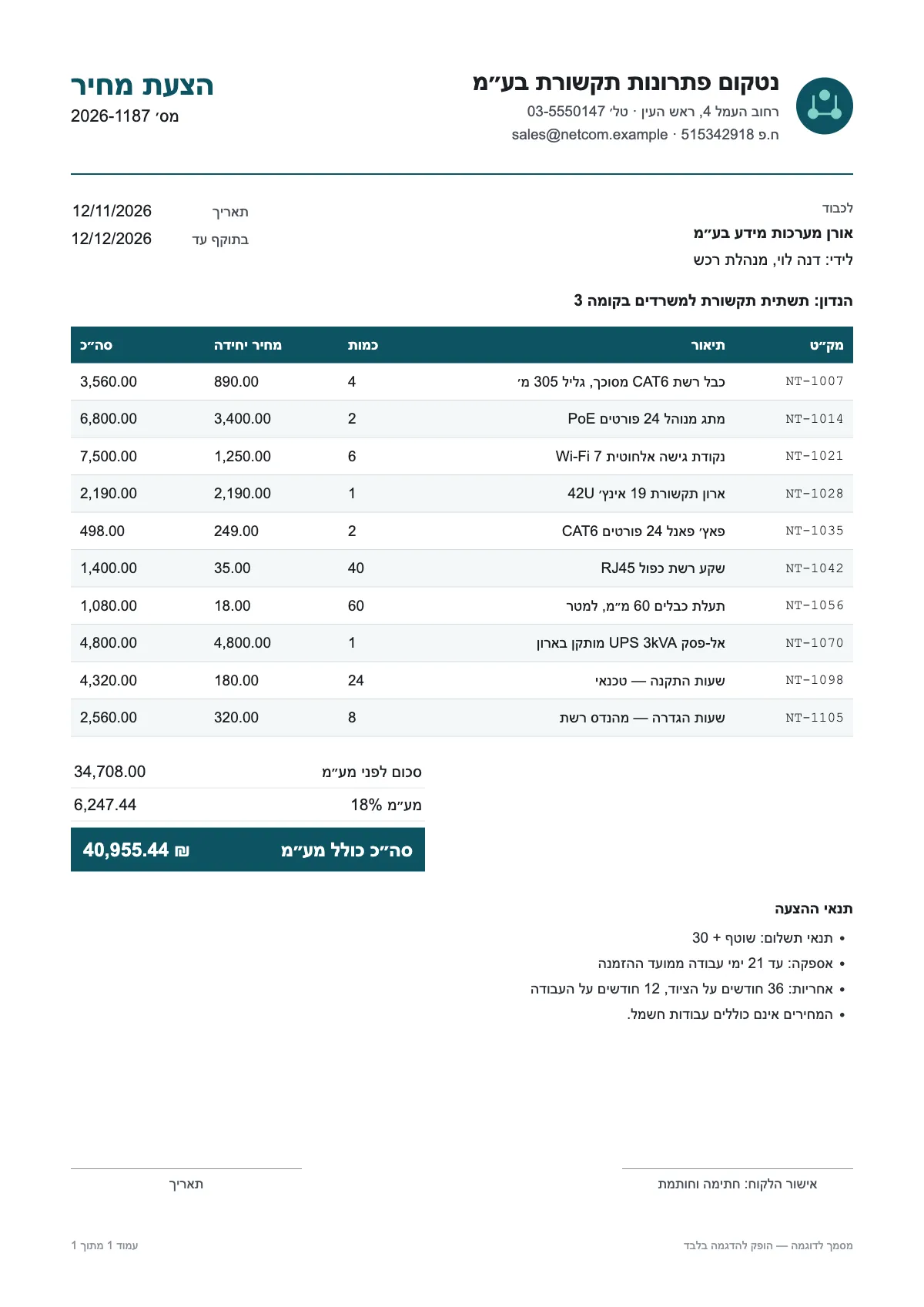
What comes out of a price quote
The engine reads a quote the way it reads an invoice, and returns only what is actually printed:
- Vendor name, address, phone and tax ID
- Quote number, quote date and validity
- Line items: item code, description, quantity, unit price and amount
- Subtotal, discount, VAT or tax rate, tax amount and total
- Payment terms, delivery terms and warranty; notes stay in the full text
How to compare quotes in Excel
Drop all the quotes together. Each file is read in turn, as a document of its own. Then, depending on what you compare:
- Totals and terms: "All documents to Excel" downloads one file with a row per quote: the vendor, total, VAT, validity, payment and delivery terms, and warranty.
- Item by item: from each quote, download the "ERP CSV", one row per line item with the vendor, quote number and date on every row, and paste the files one under another in one sheet. The columns are the same in every file, so there is nothing to match up.
- In a pivot table, put line_description in rows, vendor_name in columns and line_unit_price in values: each item's price at each supplier.
Before you compare
One supplier quotes before VAT and another including it; one in shekels, another in dollars. When they are printed, the VAT rate and the currency come out as fields, so you can see what each quote is based on. Check that item descriptions match across suppliers, and review values marked in orange.