Skip to content

Scanned contracts to Word, without retyping

Drop a contract, an agreement or an appendix, as a scanned PDF or a phone photo. The full text comes out in reading order, ready to edit in Word, and the parties, dates and amounts printed in it also come out as separate fields.

Drop a document here

PDF, JPG, PNG, WebP · up to 20 MB

No document at hand? Try a sample:

  • 5 free pages every day
  • No signup
  • Files are not stored on our side
Text

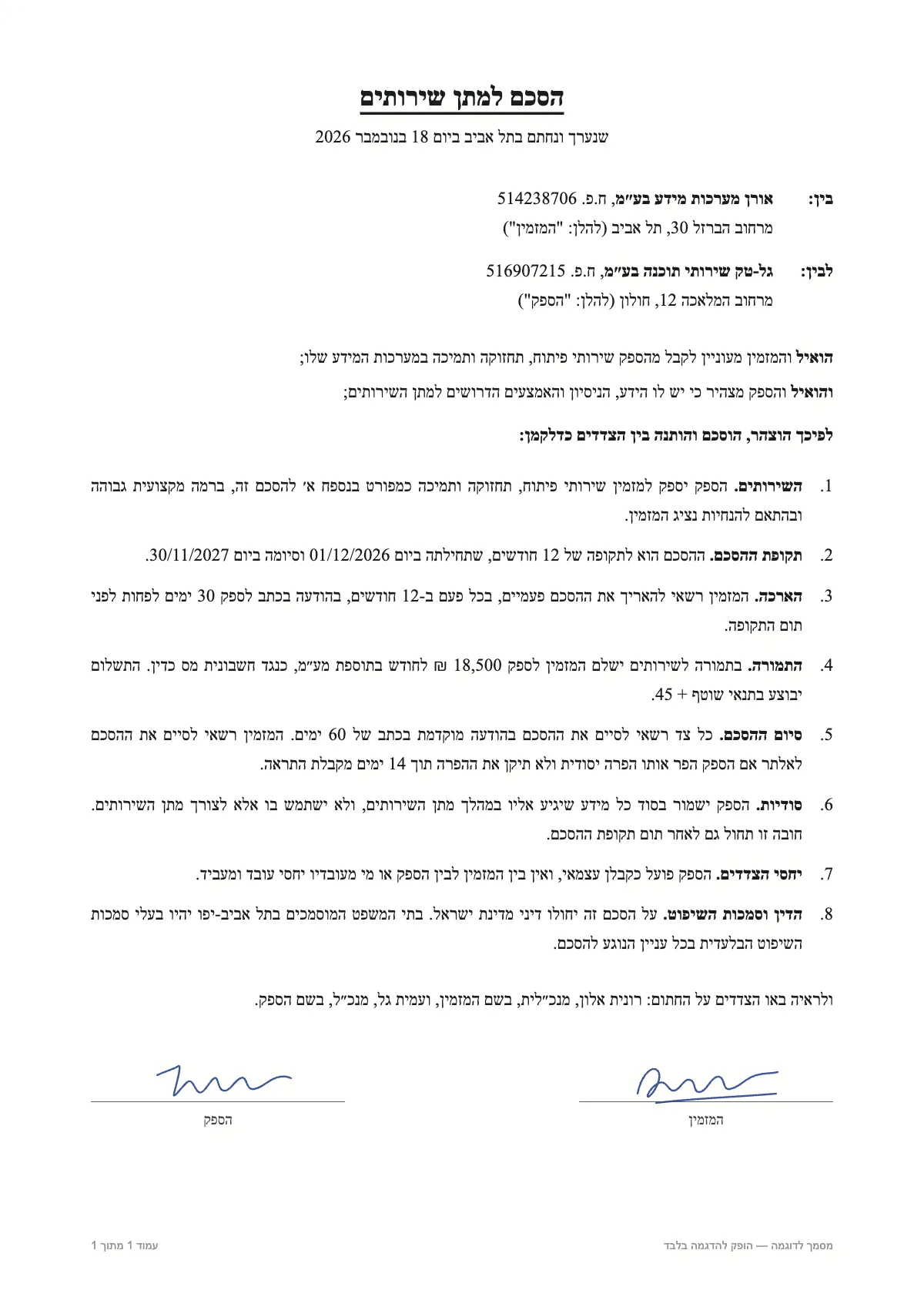
הסכם למתן שירותים

שנערך ונחתם בתל אביב ביום 18 בנובמבר 2026

בין: אורן מערכות מידע בע״מ, ח.פ. 514238706

מרחוב הברזל 30, תל אביב (להלן: "המזמין")

לבין: גל-טק שירותי תוכנה בע״מ, ח.פ. 516907215

מרחוב המלאכה 12, חולון (להלן: "הספק")

הואיל והמזמין מעוניין לקבל מהספק שירותי פיתוח, תחזוקה ותמיכה במערכות המידע שלו;

והואיל והספק מצהיר כי יש לו הידע, הניסיון והאמצעים הדרושים למתן השירותים;

לפיכך הוצהר, הוסכם והותנה בין הצדדים כדלקמן:

SampleA sample document and a result prepared in advance. This is how it looks in the workspace.
  1. 01

    The full text, editable

    Each page comes out as text in the order people type it, line by line. Clause numbers, amounts and dates inside a Hebrew line stay in place and never flip.

  2. 02

    Key facts as fields

    When they are printed on the page, the parties, company and ID numbers, dates, term, renewal and notice period, contract value, payment terms and governing law also come out as separate fields, next to the text.

  3. 03

    A long contract, one document

    A multi-page PDF is read page by page, and the text of every page comes out as one document. Free up to 5 pages per document; with a page pack, up to 100.

How to convert a scanned contract to Word

Drop the PDF on the page or choose the file. Each page is read on its own, and the text appears next to it as it is read. When it is done, download a Word file (.docx) and edit it as usual, or copy the text from the Text tab.

Scan a long contract into one PDF, so all its pages come out as one document. Each image you add is read as a document of its own.

Several contracts, one spreadsheet

Read several contracts? The "All documents to Excel" button downloads one file with a row per contract: the parties, dates, term, renewal, notice period, contract value, payment terms and governing law. That is a contract register you can sort and filter, by end date for example, without copying a single detail by hand.

What to check after converting

In a contract, one wrong digit changes the meaning. Before you work with the text, go over a few things:

  • Names, ID and company numbers, amounts and dates: compare each with the original. Values the engine was unsure about are marked in orange.
  • Clause numbering: make sure clauses and sub-clauses run in sequence, especially across page breaks.
  • Handwritten additions, strike-outs and stamps: the tool is built for print, and handwriting is read partly at best.
  • The binding text: the converted text is a working copy, and the signed contract is the document that counts.

Mixed lines: Hebrew, numbers and English

Contracts are full of mixed lines: a clause number, an amount in shekels, a date, a company name in English. Ordinary conversion flips parts of such a line. Here the text keeps its logical order, so numbers and Latin words stay whole and in place. Contracts in English read the same way.

Contracts are confidential

The file is read in memory and not stored on our side: not on a server, in a database or in system logs. The result is saved only in your browser, and you can delete it with one click. Pages are read by a paid cloud service whose terms forbid using the content sent to it to train models.

Further reading

Questions

Questions about this tool

Can I convert a scanned contract to Word?

Yes. After the read, download the text as a Word file (.docx) and edit it as usual. You can also copy it with one click, or download it as plain text, Excel or JSON.

Can I get a table of all my contracts?

Yes. Once two or more documents are read, "All documents to Excel" downloads one Excel file with a row per contract. Other document types, such as invoices, get a sheet of their own in the same file.

How many pages can I convert?

Free: up to 5 pages per document and 5 pages a day. With a page pack, up to 100 pages per document. Each page counts as one page.

Is the contract's formatting kept?

The text and its reading order are kept: in the Word file each printed line is a paragraph, Hebrew lines run right-to-left, and tables come out as Word tables. Fonts, margins and the exact layout are not reproduced: you get text to edit, not a copy of the page.

Do you keep the contracts?

No. Each page is read in memory, and neither the file nor the text is stored on our side. The result is saved only in your browser.

Does it review the contract?

No. It copies what is printed and pulls out the details that appear in it. It does not interpret the contract or replace legal advice.