From scanned documents to searchable text: a practical guide
An archive of scans is a locked cabinet: you cannot search it, copy from it or add it up. Here is how to turn it into text and data, step by step.
3 min read
OCR for Hebrew and English
Invoices, receipts, delivery notes or any scanned page: drop it here and get clean text, fields and tables, ready for Excel. Hebrew stays right-to-left and in the right order.
Drop a document here
PDF, JPG, PNG, WebP · up to 20 MB · Paste ⌘V
No document at hand? Try a sample:
API access for agents100 pages free to start
01Three ways in
One reading engine and one set of page packs, three ways in. Choose by who reads the documents: you, your agent, or your company's systems.
01 · 5 free pages a day
5 free pages every day, no signup. Drop a document and download Excel, CSV or JSON. Need more? A one-time page pack.
Open a document02 · 100 pages free to start
An MCP server and a REST API. 100 free pages with your first key, then the same packs. When pages run out, your agent gets a payment link to pass on to you.
Get API access03 · By volume
Thousands of pages a month, or documents that need to reach your ERP or CRM? Import files with fixed columns, an API for automation, and a fit for your own system.
Connect your systemsThe browser and the API share one balance: pages bought in the browser also serve the API keys on the same account.
02What comes out
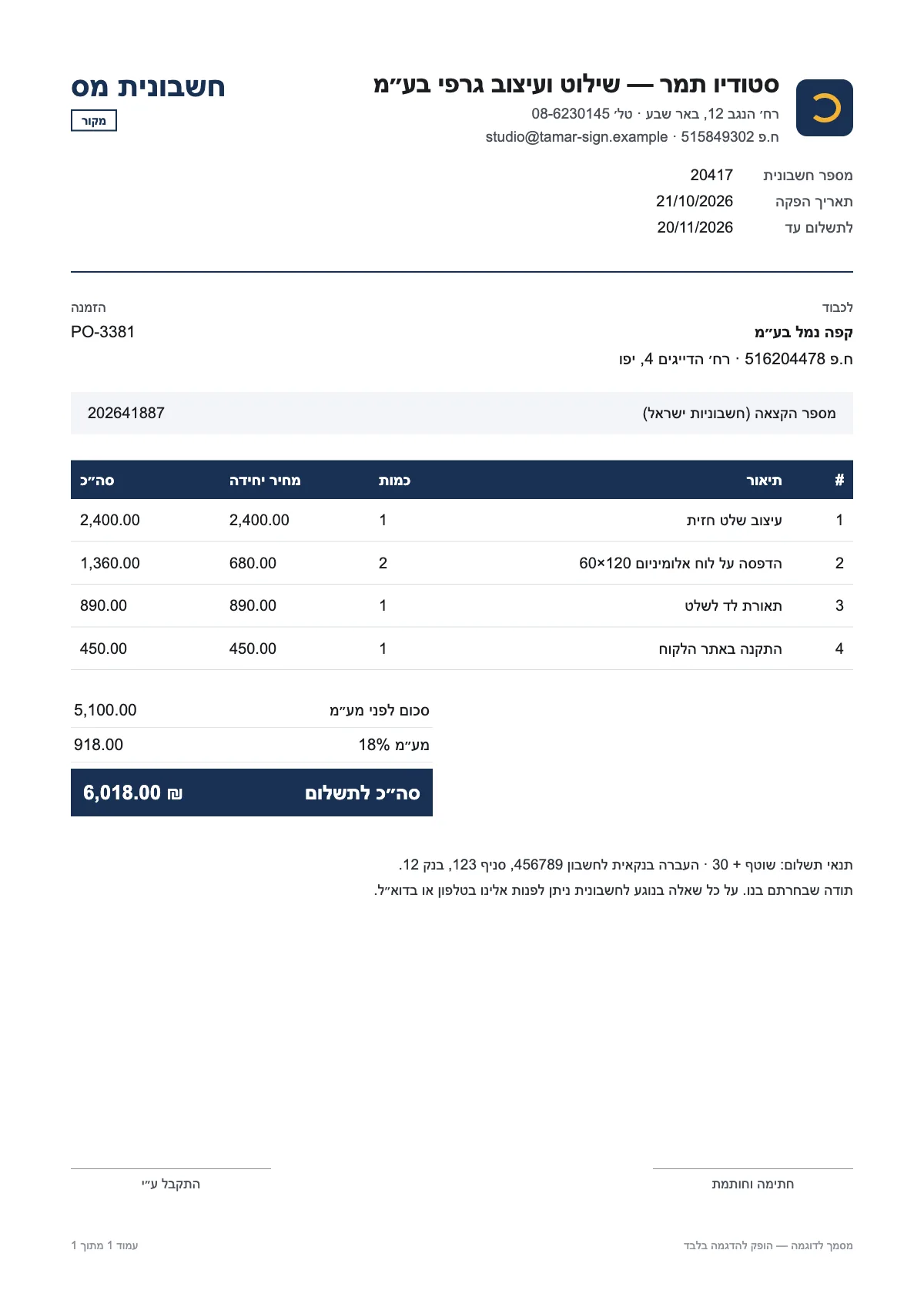
The engine reads a page the way a person does: it works out what the document is, finds the values that matter and lays out the tables. Every value appears next to the page, with a mark where it was taken from.
כפי שסוכם באסיפת הדיירים האחרונה, יחלו בקרוב עבודות שיפוץ בלובי הבניין. העבודות כוללות החלפת ריצוף, צביעה, החלפת תיבות הדואר והתקנת תאורה חדשה בכניסה. העבודות יתבצעו בימים 2–6 בנובמבר 2026, בין השעות 08:00 ל-17:00.
במהלך העבודות הכניסה לבניין תתאפשר דרך הדלת הצדדית שליד חדר האשפה. נבקש להימנע מהשארת עגלות, אופניים וחפצים בלובי, כדי לאפשר לקבלן לעבוד בבטחה.
• המעלית תושבת ביום שלישי, 3 בנובמבר, בין 09:00 ל-15:00.
• חלוקת הדואר תתבצע בתיבה זמנית ליד הדלת הצדדית.
01 · Text
Line by line, with numbers, dates and words in other languages where they belong in the sentence.
02 · Fields
Vendor, document number, dates, totals, VAT and Israeli allocation numbers, each also in a machine-readable form.
| מק״ט | תיאור הפריט | כמות |
|---|---|---|
| PP-A4-80 | נייר צילום A4 80 גרם | 10 |
| TN-85A | טונר שחור למדפסת לייזר | 4 |
| PN-BL-50 | עטים כחולים | 3 |
| BD-8CM | קלסר משרדי 8 ס״מ | 24 |
03 · Tables
Columns in the order they are printed, cell by cell, with no retyping.
04 · Files
A spreadsheet that opens right-to-left for Hebrew, a CSV Excel reads correctly, and JSON for connecting systems.
03For agents
Connect OCR-AI as an MCP server, or call the REST API directly. Your agent sends a PDF or an image and gets text, fields and tables back as JSON and Markdown, page by page.
MCP and REST. Three tools: read_document, check_balance and buy_pages. Or one POST to /api/v1/read.
100 free pages. With your first key, once per account. No card.
A payment link, not a surprise. When pages run out, nothing is read and nothing is charged. Your agent gets a Stripe link and passes it on to you.
04Built for Hebrew
Text comes out in the order people type it, right to left. An invoice number, an amount or a date inside a Hebrew line stays whole and never flips.
Company and VAT-dealer numbers, the Israel Invoices allocation number, the VAT rate and shekel amounts are recognised as separate fields, each with a normalised value.
The sheet opens in the right direction. Amounts are stored as numbers and dates as dates, so you can sum, sort and filter right away.
The CSV carries the marker Excel looks for to recognise Hebrew, so it opens as Hebrew instead of rows of symbols.
Numbers and codes inside a Hebrew line, in the right order
חשבונית INV-2041 מתאריך 21/10/2026 על סך 6,018.00 ₪
| A | B | C | |
|---|---|---|---|
| 1 | עיצוב שלט חזית | 1 | 2,400.00 |
| 2 | הדפסה על לוח אלומיניום 120×60 | 2 | 1,360.00 |
| 3 | תאורת לד לשלט | 1 | 890.00 |
05How it works
01
A PDF, an image or a phone photo. Pages are prepared in your browser (turned upright, resized and converted to an image) before anything is sent.
02
Each page is read on its own. Fields appear while it reads, and the spot each value came from is highlighted on the page.
Payment method
אשראי ויזה ****4417
Check this
03
A value the engine was not sure about is marked in orange. Fix it with a click, then download Excel, CSV or JSON.
06Privacy
The file is not kept on a server, in a database or in system logs. We keep usage data only: size, processing time and whether the read succeeded.
Earlier results are saved in this browser only, and you can delete them with one click.
Pages are read by a paid cloud service whose terms forbid using the content sent to it to train models.
07Price
5 free pages every day, no card needed. Need more? A one-time page pack, no subscription. A page whose read fails is refunded automatically.
5 free pages today
No signup
08Questions
PDF (scanned or not), JPG, PNG and WebP, up to 20 MB per file. On a phone you can photograph the document directly. Each PDF page counts as one page.
Clear printed documents read best. Blurry photos, handwriting and faded print produce more mistakes. Values the engine was unsure about are marked for checking; review them before using the data in your books.
No. The page is sent to be read and the answer comes back to you. Neither the file nor the text is stored on our side, only usage data without content. Your history lives in your browser.
Sometimes. Neat handwriting is partly read, but the tool is built mainly for printed documents. Always check handwritten results.
The 5 free pages renew every day. Wait until tomorrow, or buy a one-time page pack. Purchased pages stay valid for 12 months after your latest purchase.
No. After a purchase, your account is created from the email you entered at checkout, and you can continue on another device with a sign-in link sent by email. No passwords.
Yes: an MCP server and a REST API for agents and developers, with 100 free pages to start and the same page packs after that. For accounting software, export Excel, CSV or JSON and import it there. For high volumes, write to us.
09Guides
An archive of scans is a locked cabinet: you cannot search it, copy from it or add it up. Here is how to turn it into text and data, step by step.
3 min read
Classic OCR recognises letters. Newer systems read the document: what it is, its values, its tables. What changed, and what still needs a human eye.
3 min read
Before deciding whether to automate document entry, find out what it costs you today. A simple way to measure it, with your numbers rather than anyone else's.
3 min read
Drop it here, or anywhere on the page.
Drop a document here
PDF, JPG, PNG, WebP · up to 20 MB · Paste ⌘V